Identity Verification設定ガイド
このドキュメントの目的
Identity Verification(身元確認/eKYC)の設定方法を理解します。
所要時間
⏱️ 約20分
Identity Verificationとは
Identity VerificationはeKYC(electronic Know Your Customer)や本人確認プロセスを管理する機能です。
ユースケース:
- 顔認証による本人確認
- 身分証明書の検証
- 口座情報による本人確認
- VIPステータス確認
設定ファイル構造
identity-verification/face-verification.json
{
  "id": "ed5c1717-98eb-4415-898d-6d4584810b5e",
  "type": "face-verification",
  "attributes": {
    "label": "顔認証",
    "provider": "external-provider"
  },
  "processes": {
    "start": {
      "execution": {
        "type": "http_request",
        "http_request": {
          "url": "${VERIFICATION_API_URL}/verify/start",
          "method": "POST",
          "auth_type": "oauth2",
          "oauth_authorization": {
            "type": "client_credentials",
            "token_endpoint": "${AUTH_URL}/token",
            "client_id": "${CLIENT_ID}",
            "client_secret": "${CLIENT_SECRET}"
          }
        }
      },
      "store": {
        "application_details_mapping_rules": [
          {
            "from": "$.response_body.session_id",
            "to": "verification_session.id"
          }
        ]
      },
      "response": {
        "body_mapping_rules": [
          {
            "from": "$.response_body.session_id",
            "to": "session_id"
          }
        ]
      }
    },
    "check-status": {
      "execution": {
        "type": "http_request",
        "http_request": {
          "url": "${VERIFICATION_API_URL}/verify/status",
          "method": "POST"
        }
      },
      "transition": {
        "approved": {
          "any_of": [
            [
              {
                "path": "$.response_body.status",
                "type": "string",
                "operation": "eq",
                "value": "verified"
              }
            ]
          ]
        },
        "rejected": {
          "any_of": [
            [
              {
                "path": "$.response_body.status",
                "type": "string",
                "operation": "eq",
                "value": "failed"
              }
            ]
          ]
        }
      }
    }
  }
}
主要なフィールド
基本情報
| フィールド | 必須 | 説明 |
|---|---|---|
id | ✅ | 設定ID(UUID) |
type | ✅ | 確認タイプ(任意の文字列) |
attributes | ❌ | 属性情報 |
processes | ✅ | プロセス定義 |
Processesセクション
各プロセス(start, check-status, cancel等)を定義:
{
  "processes": {
    "start": {...},
    "check-status": {...},
    "cancel": {...}
  }
}
動的API生成:
POST /{tenant-id}/v1/me/identity-verification/applications/{type}/start
POST /{tenant-id}/v1/me/identity-verification/applications/{type}/check-status
POST /{tenant-id}/v1/me/identity-verification/applications/{type}/cancel
Processオブジェクト
各プロセスは7つのフェーズで構成:
| フェーズ | 説明 | 必須 |
|---|---|---|
request | リクエストスキーマ定義 | ❌ |
history | pre_hook フェーズ(verifications / additional_parameters)に渡す過去申込み read model の取得条件(詳細) | ❌ |
pre_hook | 実行前処理(verifications / additional_parameters)。application 経路(apply/process)・callback 経路の両方で実行される | ❌ |
execution | メイン処理(外部API呼び出し等)。省略時は no_action(サーバ側で実行する処理なし)。結果が外部から push されるコールバックプロセス等は省略可 | ❌ |
post_hook | 実行後処理 | ❌ |
transition | ステータス遷移条件 | ❌ |
store | 結果保存 | ❌ |
response | レスポンスマッピング | ❌ |
プロセス依存関係とシーケンス制御
複数のプロセスを順序立てて実行する必要がある場合、dependenciesフィールドで実行順序を制御できます。
dependencies フィールド
各プロセスにdependenciesを設定することで、前提となるプロセスの完了を必須化し、リトライポリシーを制御できます。
設定項目:
| フィールド | 型 | 説明 | 必須 |
|---|---|---|---|
required_processes | string[] | このプロセスを実行する前に完了が必要なプロセス名のリスト | ❌ |
allow_retry | boolean | プロセスの再実行を許可するか (true: 許可, false: 不可) | ✅ |
設定例
{
  "processes": {
    "apply": {
      "dependencies": {
        "required_processes": [],
        "allow_retry": false
      },
      "pre_hook": {
        "verifications": [
          {
            "type": "process_sequence"
          }
        ]
      },
      "execution": {
        "type": "no_action"
      }
    },
    "crm-registration": {
      "dependencies": {
        "required_processes": ["apply"],
        "allow_retry": false
      },
      "pre_hook": {
        "verifications": [
          {
            "type": "process_sequence"
          }
        ]
      },
      "execution": {
        "type": "http_request",
        "http_request": {
          "url": "${CRM_API_URL}/register",
          "method": "POST"
        }
      }
    },
    "request-ekyc": {
      "dependencies": {
        "required_processes": ["crm-registration"],
        "allow_retry": true
      },
      "pre_hook": {
        "verifications": [
          {
            "type": "process_sequence"
          }
        ]
      },
      "execution": {
        "type": "http_request",
        "http_request": {
          "url": "${EKYC_API_URL}/request",
          "method": "POST"
        }
      }
    }
  }
}
動作の仕組み
- 依存関係チェック:
required_processesに指定されたプロセスがすべて正常完了している場合のみ実行可能 - リトライ制御:
allow_retry: falseのプロセスは一度だけ実行可能。再実行しようとするとエラー - process_sequence検証:
pre_hook.verificationsにprocess_sequenceタイプを追加することで依存関係を強制
実行順序の例
証券口座開設の3段階プロセス:
# 1. apply(基本情報入力)- 依存なし、リトライ不可
POST /{tenant-id}/v1/me/identity-verification/applications/account-opening/apply
→ 成功 (application_id: "abc-123" を取得)

# 2. crm-registration(CRM登録)- apply完了が必須、リトライ不可
POST /{tenant-id}/v1/me/identity-verification/applications/account-opening/abc-123/crm-registration
→ 成功

# 3. request-ekyc(eKYC実施)- crm-registration完了が必須、リトライ可
POST /{tenant-id}/v1/me/identity-verification/applications/account-opening/abc-123/request-ekyc
→ 成功

# 4. request-ekycの再実行(allow_retry: true のため成功)
POST /{tenant-id}/v1/me/identity-verification/applications/account-opening/abc-123/request-ekyc
→ 成功
エラーケース
依存関係違反:
# applyを実行せずにcrm-registrationを実行
POST /{tenant-id}/v1/me/identity-verification/applications/account-opening/crm-registration
エラーレスポンス:
{
  "error": "pre_hook_validation_failed",
  "error_messages": [
    "Process 'crm-registration' requires completion of: apply"
  ]
}
リトライ禁止違反:
# apply実行後、再度applyを実行
POST /{tenant-id}/v1/me/identity-verification/applications/account-opening/abc-123/apply
エラーレスポンス:
{
  "error": "pre_hook_validation_failed",
  "error_messages": [
    "Process 'apply' does not allow retry and has already been executed"
  ]
}
ユースケース
| シナリオ | 設定 |
|---|---|
| 線形フロー | apply → ekyc → callback という順序を強制 |
| ワンタイム処理 | 基本情報入力は一度だけ実行 (allow_retry: false) |
| リトライ可能処理 | 本人確認書類の撮影失敗時に再実行を許可 (allow_retry: true) |
| 複数依存 | プロセスDが「プロセスA」「プロセスB」「プロセスC」すべての完了を必要とする |
注意事項
- 循環依存の禁止: プロセスA → プロセスB → プロセスA のような循環依存は設定しない
- process_sequence検証必須: 依存関係を強制するには
pre_hook.verificationsにprocess_sequenceを追加 - リトライポリシー設計: ビジネス要件に応じて
allow_retryを適切に設定 - エラーハンドリング: クライアント側で依存関係エラーを適切に処理
参考: 身元確認申込みガイド - プロセス依存関係とシーケンス制御
Request Schema
リクエストボディのバリデーション(JSONSchema):
{
  "request": {
    "schema": {
      "type": "object",
      "required": ["user_id", "document_type"],
      "properties": {
        "user_id": {
          "type": "string",
          "description": "ユーザーID"
        },
        "document_type": {
          "type": "string",
          "enum": ["passport", "drivers_license"],
          "description": "身分証明書タイプ"
        }
      }
    }
  }
}
動作: APIリクエスト受信時にJSONSchemaで検証。不正な場合は400エラー。
history(過去申込みの取得条件)
用途: pre_hook フェーズに渡す「過去申込みの read model」を、宣言した条件で絞り込んで取得する
execution(メイン処理)の前に、history.filters で宣言した条件に一致する過去の申込みを1回の SQL で取得し、pre_hook フェーズ(verifications / additional_parameters)に渡します。これにより verifier 等は過去申込みを参照したドメイン判定ができます。
利用範囲:
history.filtersに一致する過去申込みは$.previous_applications(配列)として、pre_hook のverifications/additional_parametersのcondition、および execution / store / response の mapping_rules から参照できます(#1592)。配列射影で各申込みの値を取り出せます(例:$.previous_applications[*].application_details.external_application_id)。$.previous_applicationsに現れる範囲はhistory.filtersの宣言で決まるため、mapping で使う分だけ filters に宣言してください(過剰露出を避ける)。
設定構造
{
  "processes": {
    "apply": {
      "history": {
        "filters": [
          { "types": ["investment-account-opening"], "statuses": "running" }
        ]
      },
      "pre_hook": {
        "verifications": [
          { "type": "duplicate_application" }
        ]
      },
      "execution": { "type": "no_action" }
    }
  }
}
| フィールド | 型 | 説明 | 必須 |
|---|---|---|---|
filters | object[] | 取得条件の配列。複数指定すると OR 結合で union を取得 | ✅ |
filters[].types | string[] | 対象の verification_type(少なくとも1件必須。空のフィルタは無視される) | ✅ |
filters[].statuses | string | string[] | "running" キーワード、または明示的なステータス値の配列 | ✅ |
"running"キーワード は進行中ステータスrequested/applying/applied/examination_processingに展開されます。typesかstatusesが空のフィルタは取得対象から除外されます。
duplicate_application との連携(マージ挙動)
duplicate_application 検証は「同一 type に進行中(running)の申込みがあれば拒否」します。この検証が動くには「当該 type の running」を観測している必要があるため、history の宣言有無に関わらず { types:[当該type], statuses:"running" } が常にマージされます(置換ではなく追加。同一フィルタは重複排除)。
explicit history | duplicate_application | 取得される履歴 |
|---|---|---|
| なし | なし | 取得しない |
| なし | あり | running(当該type) のみ |
| あり | なし | explicit filters のみ |
| あり | あり | explicit filters + running(当該type)(マージ) |
これにより、history 未宣言でも、また explicit history が当該 type をカバーしていなくても、重複防止が無効化されません(後方互換)。
注意事項
historyを宣言しない場合、duplicate_application以外の用途では過去申込みは取得されません(無駄なクエリを避ける設計)。types必須・"running"キーワード展開はコード上の仕様です(IdentityVerificationApplicationStatus.isRunning())。
Pre Hook(実行前処理)
用途: メイン処理(execution)の前にビジネスロジック検証や追加データ取得を実行
Pre Hookは2つのコンポーネントで構成されます:
- Verifications: ビジネスロジック検証(プロセス依存関係、ユーザークレーム検証など)
- Additional Parameters: 追加データ取得(外部API呼び出しなど)
実行順序は常に Verifications → Additional Parameters です。
Verifications(検証処理)
実行前に各種ビジネスロジック検証を行います。
検証タイプ一覧:
| type | 概要 | 必須パラメータ |
|---|---|---|
process_sequence | プロセス依存関係とリトライ制御の検証 | なし |
user_claim | リクエスト内容とユーザークレームの一致確認 | details.verification_parameters |
application_limitation | 申込み可能数チェック(予定) | - |
duplicate_application | 重複申請チェック(同一 type の進行中申込みがあれば拒否)。history と連携 | なし |
assert | 宣言した条件式が成立しなければ拒否。$.previous_applications 等の context に対する汎用 deny ルール | details.assertions(condition + message) |
assert 検証
用途: 任意の条件式で deny する汎用 verifier。CDD(継続的顧客デューデリジェンス)のような「過去申込みベースの判定」を、$.previous_applications に対する条件式として宣言的に表現できる。
各アサーションの condition(ConditionSpec と同じ条件言語)が成立必須で、不成立なら message を理由に拒否(400 pre_hook_validation_failed)。評価 context は gate condition と同じ($.user / $.application / $.previous_applications / $.request_body / $.request_attributes)。
{
  "type": "assert",
  "details": {
    "assertions": [
      {
        "condition": { "operation": "missing", "path": "$.previous_applications[0]" },
        "message": "既存の申込みが存在するため実行できません"
      }
    ]
  }
}
process_sequence 検証
用途: プロセスの実行順序を強制、リトライを制御
{
  "pre_hook": {
    "verifications": [
      {
        "type": "process_sequence"
      }
    ]
  },
  "dependencies": {
    "required_processes": ["apply"],
    "allow_retry": false
  }
}
動作:
required_processesに指定されたプロセスがすべて完了しているかチェックallow_retry: falseの場合、既に実行済みのプロセスの再実行を拒否
エラー例:
{
  "error": "pre_hook_validation_failed",
  "error_messages": [
    "Process 'crm-registration' requires completion of: apply"
  ]
}
参考: プロセス依存関係とシーケンス制御
user_claim 検証
用途: リクエストデータとユーザー属性の一致を検証
{
  "pre_hook": {
    "verifications": [
      {
        "type": "user_claim",
        "details": {
          "verification_parameters": [
            {
              "request_json_path": "$.mobile_phone_number",
              "user_claim_json_path": "$.phone_number"
            },
            {
              "request_json_path": "$.email",
              "user_claim_json_path": "$.email"
            }
          ]
        }
      }
    ]
  }
}
パラメータ説明:
| フィールド | 説明 |
|---|---|
operation | 比較演算子(省略時 eq)。request_json_path の値(target)を user_claim_json_path の値(expected)と比較する。詳細は下記 |
request_json_path | リクエストから値を取得する JSONPath(例: $.mobile_phone_number) |
user_claim_json_path | ユーザー属性から値を取得する JSONPath(例: $.email / $.custom_properties.x[*].id) |
JSONPath 表記の注意:
- どちらのパスも Jayway JsonPath で評価される。
$始まりを推奨(ネスト・配列[*]を使うには必須)。"email"のようなトップレベル単一キーは Jayway が root 解決するため bare でも動くが、表記は$.emailに揃えると安全。 request_json_pathの root はリクエストボディ直下($.id)。mapping rules の$.request_body.*とは異なるので、$.request_body.idと書くと常に不一致=400になる点に注意。
動作:
- リクエストの
mobile_phone_numberとユーザーのphone_numberを比較 - 一致しない場合はエラー
operation(比較演算子):
operation を省略すると eq(完全一致)となり、従来どおりの挙動です(後方互換)。配列メンバーシップ等を表現したい場合は演算子を指定します。
| operation | 意味 | 成立条件(成立しなければ 400) |
|---|---|---|
eq(既定) | 完全一致 | request値 = user値 |
ne | 不一致 | request値 ≠ user値 |
in | メンバーシップ | request値が user配列([*])に含まれる |
nin | 非メンバーシップ | request値が user配列に含まれない |
contains | 包含 | request集合(配列)が user値を含む |
gt / gte / lt / lte | 数値比較 | request値 と user値 の大小 |
exists / missing | 存在 | request値が 非null / null |
regex | 正規表現 | request値(文字列)が user値のパターンに一致 |
演算子の実体は
ConditionOperation(mapping rules / transition と共通)。
配列メンバーシップ例(リクエストで指定したキーがユーザーの保有配列に含まれることを担保):
{
  "type": "user_claim",
  "details": {
    "verification_parameters": [
      {
        "operation": "in",
        "request_json_path": "$.id",
        "user_claim_json_path": "$.custom_properties.authentication_devices[*].id"
      }
    ]
  }
}
user_claim_json_pathは[*]を含む JSONPath で配列を取得する(Jayway の indefinite path は配列を返す)。- ユーザーが保有しないキーを指定したリクエストは
400 pre_hook_validation_failedで弾かれる(remove等のマッチ0件 no-op によるサイレント成功を防ぐ)。
注意:
- null / 欠落:
in/nin/containsは request値が null / 欠落のとき成立せず失敗(=未指定キーを弾く意図)。eqの挙動は不変(Objects.equals)。 - 型:
in/eqは型強制を行わない(Objects.equals/Collection.contains)。数値キーは request と user で型を揃えること。文字列キー(id 等)は問題なし。 - 未知の operation: タイポ等で未知の演算子を指定すると設定不正として失敗し、
unknown operationを含むエラー+ error ログを出す(全リクエストをサイレントに弾かない)。
エラー例:
{
  "error": "pre_hook_validation_failed",
  "error_messages": [
    "User claim verification failed: mobile_phone_number mismatch"
  ]
}
ユースケース:
- 口座開設時に登録済みメールアドレスとの一致を確認
- 電話番号認証済みユーザーのみ申込み可能にする
- 申込みで指定した配列要素(デバイス等)のキーがユーザーの保有要素に含まれることを担保(
in)
複数検証の組み合わせ
複数の検証を設定順に実行できます:
{
  "pre_hook": {
    "verifications": [
      {
        "type": "process_sequence"
      },
      {
        "type": "user_claim",
        "details": {
          "verification_parameters": [
            {
              "request_json_path": "$.email",
              "user_claim_json_path": "$.email"
            }
          ]
        }
      }
    ]
  }
}
実行順序: process_sequence検証 → user_claim検証
いずれかが失敗した場合: 処理は中断され、400エラーを返却
条件付き実行(Conditional Execution)
Verificationsコンポーネントにconditionフィールドを追加することで、実行を動的に制御できます。
メリット:
- パフォーマンス最適化(不要な検証をスキップ)
- リスクベースの認証制御
- 柔軟なビジネスロジック実装
条件演算子一覧:
| 演算子 | 説明 | 例 |
|---|---|---|
eq | 等しい | {"operation": "eq", "path": "$.user.role", "value": "admin"} |
ne | 等しくない | {"operation": "ne", "path": "$.user.status", "value": "suspended"} |
gt | より大きい | {"operation": "gt", "path": "$.request_body.amount", "value": 1000} |
gte | 以上 | {"operation": "gte", "path": "$.request_body.amount", "value": 100000} |
lt | より小さい | {"operation": "lt", "path": "$.risk_score", "value": 50} |
lte | 以下 | {"operation": "lte", "path": "$.retry_count", "value": 3} |
in | 含まれる | {"operation": "in", "path": "$.user.country", "value": ["US", "EU", "JP"]} |
nin | 含まれない | {"operation": "nin", "path": "$.user.status", "value": ["banned"]} |
exists | 存在する | {"operation": "exists", "path": "$.user.verified"} |
missing | 存在しない | {"operation": "missing", "path": "$.user.temp_flag"} |
contains | 文字列を含む | {"operation": "contains", "path": "$.user.email", "value": "@company.com"} |
regex | 正規表現 | {"operation": "regex", "path": "$.user.phone", "value": "^\\+81"} |
複合演算子:
| 演算子 | 説明 | 使用例 |
|---|---|---|
allOf | すべての条件を満たす(AND) | {"operation": "allOf", "value": [cond1, cond2]} |
anyOf | いずれかの条件を満たす(OR) | {"operation": "anyOf", "value": [cond1, cond2]} |
例1: 高額取引時のみ追加検証
{
  "pre_hook": {
    "verifications": [
      {
        "type": "user_claim",
        "details": {
          "verification_parameters": [
            {
              "request_json_path": "$.identity_document_number",
              "user_claim_json_path": "$.id_number"
            }
          ]
        },
        "condition": {
          "operation": "gte",
          "path": "$.request_body.amount",
          "value": 100000
        }
      }
    ]
  }
}
動作: リクエストのamountが100,000以上の場合のみ、本人確認書類番号の検証を実行
例2: 管理者のみ実行
{
  "pre_hook": {
    "verifications": [
      {
        "type": "enhanced_verification",
        "condition": {
          "operation": "eq",
          "path": "$.user.role",
          "value": "admin"
        }
      }
    ]
  }
}
例3: 複合条件(Premium会員かつ18歳以上)
{
  "pre_hook": {
    "verifications": [
      {
        "type": "premium_verification",
        "condition": {
          "operation": "allOf",
          "value": [
            {
              "operation": "eq",
              "path": "$.user.tier",
              "value": "premium"
            },
            {
              "operation": "gte",
              "path": "$.user.age",
              "value": 18
            }
          ]
        }
      }
    ]
  }
}
例4: 地域ベースの条件
{
  "pre_hook": {
    "verifications": [
      {
        "type": "geo_compliance_check",
        "condition": {
          "operation": "in",
          "path": "$.user.country",
          "value": ["US", "CA", "GB"]
        }
      }
    ]
  }
}
コンテキストデータ:
条件評価で利用可能なデータ:
{
  "user": {
    "sub": "ユーザーID",
    "role": "admin",
    "tier": "premium",
    "age": 25,
    "country": "JP"
  },
  "application": {
    "id": "申込みID",
    "type": "申込み種別",
    "status": "申込みステータス"
  },
  "previous_applications": [
    {
      "id": "過去の申込みID",
      "type": "申込み種別",
      "status": "申込みステータス",
      "application_details": { "external_application_id": "外部申込みID" }
    }
  ],
  "request_body": {
    "amount": 50000
  },
  "request_attributes": {
    "ip": "クライアントIP"
  }
}
Additional Parameters
{
  "pre_hook": {
    "additional_parameters": [
      {
        "type": "http_request",
        "details": {
          "url": "${EXTERNAL_API_URL}/get-user-info",
          "method": "POST",
          "note": "ユーザー情報を事前取得",
          "auth_type": "oauth2",
          "oauth_authorization": {
            "type": "client_credentials",
            "token_endpoint": "${AUTH_URL}/token",
            "client_id": "${CLIENT_ID}",
            "client_secret": "${CLIENT_SECRET}",
            "cache_enabled": true,
            "cache_ttl_seconds": 3600
          },
          "body_mapping_rules": [
            {
              "from": "$.user.external_user_id",
              "to": "user_id"
            }
          ]
        }
      }
    ]
  }
}
重要なポイント:
- 実行順序: pre_hook → execution → post_hook
- 結果の保存:
$.pre_hook_additional_parameters[0]に保存される - 後続での参照: executionやstoreで結果を参照可能
Pre Hookの結果を参照する例
{
  "pre_hook": {
    "additional_parameters": [
      {
        "type": "http_request",
        "details": {
          "url": "${EXTERNAL_API_URL}/lookup",
          "method": "GET"
        }
      }
    ]
  },
  "execution": {
    "type": "http_request",
    "http_request": {
      "url": "${VERIFICATION_API_URL}/verify",
      "method": "POST",
      "body_mapping_rules": [
        {
          "from": "$.pre_hook_additional_parameters[0].response_body.verification_id",
          "to": "verification_id",
          "note": "Pre Hookの結果を使用"
        }
      ]
    }
  }
}
JSONPath:
$.pre_hook_additional_parameters[0]- 1番目のPre Hook結果$.pre_hook_additional_parameters[0].response_body- レスポンスボディ$.pre_hook_additional_parameters[0].response_headers- レスポンスヘッダー
Execution
外部サービスとの連携方法を定義:
{
  "execution": {
    "type": "http_request",
    "http_request": {
      "url": "${VERIFICATION_API_URL}/verify",
      "method": "POST",
      "auth_type": "oauth2",
      "oauth_authorization": {
        "type": "client_credentials",
        "token_endpoint": "${AUTH_URL}/token",
        "client_id": "${CLIENT_ID}",
        "client_secret": "${CLIENT_SECRET}"
      },
      "body_mapping_rules": [
        {
          "from": "$.request_body.user_id",
          "to": "user_id"
        }
      ]
    }
  }
}
Store(結果保存)
プロセスの実行結果をIdentity Verification Applicationに保存:
{
  "store": {
    "application_details_mapping_rules": [
      {
        "from": "$.response_body.session_id",
        "to": "verification_session.id"
      },
      {
        "from": "$.response_body.url",
        "to": "verification_session.url"
      },
      {
        "from": "$.pre_hook_additional_parameters[0].response_body.user_status",
        "to": "user_info.status"
      }
    ]
  }
}
用途:
- 後続のプロセスで参照するデータを保存
- Identity Verification Application詳細として保存
$.application.processes.{process-name}で参照可能
参照例(後続のcheck-statusプロセスで):
{
  "body_mapping_rules": [
    {
      "from": "$.application.processes.start.verification_session.id",
      "to": "session_id",
      "note": "startプロセスで保存したsession_idを使用"
    }
  ]
}
Transition(ステータス遷移)
プロセス実行結果に基づいてステータスを遷移:
{
  "transition": {
    "approved": {
      "any_of": [
        [
          {
            "path": "$.response_body.status",
            "type": "string",
            "operation": "eq",
            "value": "verified"
          }
        ]
      ]
    },
    "rejected": {
      "any_of": [
        [
          {
            "path": "$.response_body.status",
            "operation": "eq",
            "value": "failed"
          }
        ]
      ]
    }
  }
}
ステータス:
approved- 確認成功rejected- 確認失敗canceled- キャンセルpending- 処理中(デフォルト)
Callbackプロセス
外部サービスからの非同期コールバックを受け取るプロセスです。
基本設定
{
  "processes": {
    "callback-result": {
      "type": "callback",
      "request": {
        "basic_auth": {
          "username": "external_service",
          "password": "${CALLBACK_PASSWORD}"
        },
        "schema": {
          "type": "object",
          "required": ["application_id", "status"],
          "properties": {
            "application_id": { "type": "string" },
            "status": { "type": "string" },
            "verification": { "type": "object" },
            "claims": { "type": "object" }
          }
        }
      },
      "transition": {
        "approved": {
          "any_of": [[
            {
              "path": "$.request_body.status",
              "type": "string",
              "operation": "eq",
              "value": "approved"
            }
          ]]
        },
        "rejected": {
          "any_of": [[
            {
              "path": "$.request_body.status",
              "type": "string",
              "operation": "eq",
              "value": "rejected"
            }
          ]]
        }
      }
    }
  }
}
Callback API エンドポイント
パターン1: application_id をパスパラメータで特定
POST /{tenant-id}/internal/v1/identity-verification/callback/{type}/{application-id}/{process}
例:
POST /tenant-123/internal/v1/identity-verification/callback/investment-account-opening/abc-456/callback-result
Authorization: Basic dXNlcm5hbWU6cGFzc3dvcmQ=
Content-Type: application/json

{
  "status": "approved",
  "verification": { ... },
  "claims": { ... }
}
パターン2: application_id をボディから特定
POST /{tenant-id}/internal/v1/identity-verification/callback/{type}/{process}
例:
POST /tenant-123/internal/v1/identity-verification/callback/investment-account-opening/callback-result
Authorization: Basic dXNlcm5hbWU6cGFzc3dvcmQ=
Content-Type: application/json

{
  "application_id": "ext-app-456",
  "status": "approved",
  "verification": { ... },
  "claims": { ... }
}
Common設定との連携
common.callback_application_id_paramで申請ID識別パラメータ名を指定します:
{
  "common": {
    "callback_application_id_param": "application_id"
  },
  "processes": {
    "callback-result": {
      "type": "callback",
      "request": {
        "schema": {
          "type": "object",
          "required": ["application_id"],
          "properties": {
            "application_id": { "type": "string" }
          }
        }
      }
    }
  }
}
動作: リクエストボディのapplication_idフィールドで申請を特定(パターン2の場合)
Basic認証
コールバックAPIにはBasic認証を設定できます:
{
  "request": {
    "basic_auth": {
      "username": "kyc_callback_user",
      "password": "secure_password_123"
    }
  }
}
セキュリティ:
- パスワードは環境変数から取得することを推奨(例:
${CALLBACK_PASSWORD}) - HTTPS通信必須
- IPホワイトリストとの併用を推奨
コールバック処理の流れ
外部サービス
  ↓
  POST /callback/{type}/{application-id}/{process}
  + Basic認証
  ↓
idp-server
  ↓ Request Schema検証
  ↓ Pre Hook(必要に応じて)
  ↓ Execution(通常はno_action)
  ↓ Transition(ステータス遷移判定)
  ↓ Store(結果保存)
  ↓ verified_claims生成(approved時)
  ↓
200 OK
ユースケース
| シナリオ | 説明 |
|---|---|
| 審査結果通知 | eKYC審査完了後、外部サービスから結果を受信 |
| ステータス更新 | 申込み処理の各段階で外部サービスから進捗を受信 |
| verified_claims登録 | 本人確認完了後、検証済みクレームを自動登録 |
注意事項
- 認証必須: Basic認証またはHMAC認証を必ず設定
- スキーマ検証: 不正なリクエストを防ぐためスキーマ定義を厳密に
- 冪等性: 同じコールバックが複数回呼ばれても安全な設計にする
- タイムアウト: 外部サービス側でリトライロジックを実装
Result(結果設定)
申込みが承認(approved)されたときに、ユーザーの属性をどう更新するかを定義するセクションです。 申込みステータスの遷移から User エンティティへの反映までの全体像は以下の通りです。
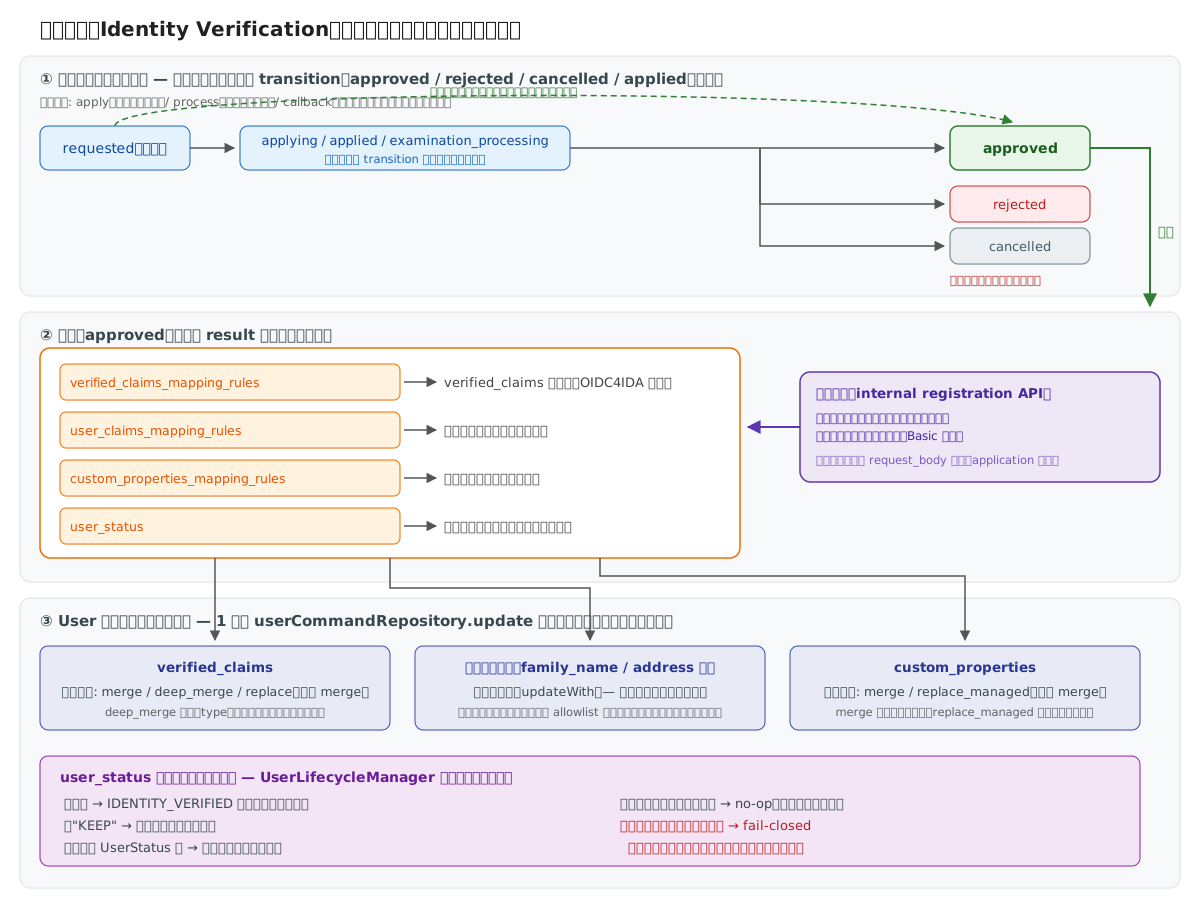
- 評価タイミング:
resultは承認時のみ評価される。rejected/cancelledではユーザー属性は更新されない - 更新の集約: verified_claims・標準クレーム・custom_properties・ステータスは 1 回のユーザー更新に集約される(同一トランザクション)
- 適用経路: 申込み承認・コールバック承認・直接登録の 3 経路すべてに適用される
- マッピングの参照元: 後続プロセス・コールバックでの承認時は
$.application.application_details.*を参照できるが、単一プロセスの即時承認では申込み(application)が未生成のため$.request_body.*を参照すること。直接登録も同様に$.request_body.*のみ
verified_claims_mapping_rules
OIDC4IDA(OpenID Connect for Identity Assurance)準拠のverified_claims生成ルールです。
設定例:
{
  "result": {
    "verified_claims_mapping_rules": [
      {
        "static_value": "jp_aml",
        "to": "verification.trust_framework"
      },
      {
        "from": "$.response_body.user.family_name",
        "to": "claims.family_name"
      },
      {
        "from": "$.response_body.user.given_name",
        "to": "claims.given_name"
      },
      {
        "from": "$.response_body.user.birthdate",
        "to": "claims.birthdate"
      }
    ]
  }
}
フィールド構造:
verification.*: 身元確認のメタデータtrust_framework: 信頼フレームワーク(例:jp_aml)evidence: 証拠情報(例: 本人確認書類の種類)
claims.*: 検証済みユーザー属性family_name: 姓given_name: 名birthdate: 生年月日address: 住所- など
動作:
- eKYC等の外部サービスから取得した情報を
verified_claims形式にマッピング - OIDCトークンに含めて発行
- クライアントアプリケーションが信頼できる身元確認済み情報として利用可能
使用シーン:
- eKYC連携(本人確認書類のスキャン等)
- 身元確認済みIDの発行
- Verified Credentialsの生成
参照仕様:
verified_claims_update_policy
承認時に生成した verified_claims をユーザーへ反映する際のマージ戦略です。
{
  "result": {
    "verified_claims_update_policy": "deep_merge"
  }
}
| 値 | 挙動 | 用途 |
|---|---|---|
merge(省略時) | トップレベルキー(claims / verification)単位の putAll。出力したオブジェクトは丸ごと差し替え | 毎回フルセットを出力するワンショット型 |
deep_merge | claims.* / verification.* を第2レベルのキー単位でマージ。出力しなかったキーは保持 | 段階的KYC(氏名住所の検証後に年収確認を追加しても共存) |
replace | 完全置換 | 全面再確認で旧データを残さない更新 |
注意:
- デフォルトは全経路(申込み承認・コールバック・直接登録)共通で
merge deep_mergeでは「verificationは最後の審査のもの、claimsは複数審査の寄せ集め」となり得る。審査単位の正確な来歴は身元確認結果(identity_verification_result)で追跡できるcustom_properties_update_policyと選択肢が異なるのは設計意図: verified_claims は身元確認専有の2層構造のため、マージ深度の選択(merge/deep_merge)と全置換(replace)が成立する
user_claims_mapping_rules
承認時にユーザーの標準クレーム(family_name、given_name、address 等)を更新するルールです。
設定例:
{
  "result": {
    "user_claims_mapping_rules": [
      {
        "from": "$.application.application_details.last_name",
        "to": "family_name"
      },
      {
        "from": "$.application.application_details.address",
        "to": "address"
      }
    ]
  }
}
動作:
- マッピングした項目のみ部分更新(マッピングしていない項目は変更されない)
- 更新できるのは標準プロフィールクレームのみ(allowlist 方式):
name/given_name/family_name/middle_name/nickname/profile/picture/website/email/email_verified/gender/birthdate/zoneinfo/locale/phone_number/phone_number_verified/address - 権限系(
roles等)・識別子(sub/preferred_username)・status・custom_propertiesは宛先に指定しても無視される(status/custom_propertiesは専用設定user_status/custom_properties_mapping_rulesを使う) preferred_usernameはテナントのIDポリシー(TenantIdentityPolicy)が導出する一意キーであり、一意性検証は登録経路でのみ行われるため、身元確認経由では直接更新できない- ただし
name/email/phone_numberを更新した場合は、テナントIDポリシーに基づいてpreferred_usernameが自動的に再計算される(他の更新経路と同じ規約) - 再計算した
preferred_usernameが他ユーザーと重複する場合は一意制約により 409 Conflict となり、承認はトランザクションごとロールバックされる(ユーザー・申込み・結果すべて未更新)
注意:
email/phone_numberはログイン識別子やテナントのIDポリシーに使われている場合があるため、上書きは慎重に設計することemail/phone_numberを更新してもemail_verified/phone_number_verifiedは自動では変わらない(旧アドレスの検証結果が残る)。更新する設定では{ "static_value": true, "to": "email_verified" }のように検証フラグも明示的にマッピングすることaddressはオブジェクト単位の置換。部分フィールドだけマッピングすると他のフィールドが消えるため、必ず完全なオブジェクトをマッピングすること- 型不一致のマッピング(例: boolean の
email_verifiedに文字列)は承認時にエラーとなり、ユーザーは更新されない(fail-closed)
custom_properties_mapping_rules
承認時にユーザーの custom_properties(業務属性)を更新するルールです。
設定例:
{
  "result": {
    "custom_properties_mapping_rules": [
      {
        "from": "$.application.application_details.kyc_level",
        "to": "kyc_level"
      },
      {
        "static_value": true,
        "to": "verified_member"
      }
    ]
  }
}
動作:
- キー単位のマージ(同一キーは上書き、それ以外の既存キーは保持)
- 複数の身元確認タイプを順に承認すると属性が累積される
使用シーン:
- KYCレベル・会員ランク等の業務属性の反映
- 外部システムの顧客IDの保持
custom_properties_update_policy
承認時に custom_properties をユーザーへ反映する際のマージ戦略です。
{
  "result": {
    "custom_properties_update_policy": "replace_managed"
  }
}
| 値 | 値が生成されたキー | 生成されなかったキー | ルール外のキー(他type・Federation由来) |
|---|---|---|---|
merge(省略時) | 上書き | 既存値を保持 | 影響なし |
replace_managed | 上書き | 削除 | 影響なし |
- 「管理対象キー」は、その設定の
custom_properties_mapping_rulesに宣言されたtoのトップレベルキー集合 replace_managedは定期再確認(CDD)等で「今回の審査で該当しなかった属性(risk_flag等)を確実に消したい」場合に使用するto: "*"(ワイルドカード展開)は管理対象キーを静的に宣言できないため、replace_managedでも同期削除は効かない(追加・上書きのみ)。削除が必要なキーはtoを明示的に宣言すること
トークンへの反映に関する注意:
claims:<名前>スコープによるアクセストークンへの反映では、status/ex_sub/roles/permissions/assigned_tenants/assigned_organizations/authentication_devicesは予約クレーム名であり、User の対応フィールドが優先される。これらの名前で custom_properties を書いてもトークンには反映されない- 属性更新は新規の認可で発行されたトークンに反映される。リフレッシュグラントでの再発行はグラント保存時のユーザースナップショットを引き継ぐため、承認後の更新は反映されない(UserInfo は常に最新のユーザー属性を返す)
verified_claims_update_policyと選択肢が異なるのは設計意図: custom_properties は複数の身元確認タイプや Federation も書き込む共有のフラットなキー集合のため、mergeは最初からキー単位であり(深度の選択肢が不要)、他機能のキーを破壊する全置換は提供しない。代わりに宣言キーのみ同期するreplace_managedを用意している
user_status
承認時のユーザーステータス遷移を制御します。
設定例:
{
  "result": {
    "user_status": "KEEP"
  }
}
指定可能な値:
- 省略時:
IDENTITY_VERIFIEDに遷移(従来互換) KEEP: 遷移しない(現状維持)。業務属性のみ更新するタイプ向けUserStatusの値(IDENTITY_VERIFICATION_REQUIRED等): 指定ステータスに遷移
動作:
- 遷移は
UserLifecycleManagerの遷移ルールに従う(有効な値だが許可されない遷移はエラー) - 現在と同じステータスへの指定は何もしない(再承認でもエラーにならない)
- 未知のステータス名(typo 等)は KEEP 扱い: 承認は失敗させず現状ステータスを維持し、誤設定を
errorログで表面化する(設定不備で承認フロー全体を止めない)
applied_user_claims(適用値の記録)
承認時に上記ルール(user_claims_mapping_rules / custom_properties_mapping_rules / user_status)で実際にユーザーへ適用した値を、身元確認結果(identity_verification_result)の applied_user_claims カラムに記録します。設定する項目ではなく、承認時に自動で記録される出力です。
従来は verified_claims のみ結果に残り、標準クレーム・custom_properties・ステータスの変更は痕跡が残りませんでした。applied_user_claims により、各結果行が「この承認で何が変わったか」を自己記述するため、監査・トラブルシュートに利用できます。
記録される形状:
{
  "applied_user_claims": {
    "user_claims": { "family_name": "山田", "given_name": "太郎" },
    "custom_properties": { "kyc_level": "gold" },
    "user_status": "IDENTITY_VERIFIED"
  }
}
user_claims: 実際に適用した標準クレーム(allowlist 適用後の値のみ)custom_properties: 実際に適用した業務属性user_status: 実際に遷移したステータス(KEEPや同一ステータスで遷移が起きなかった場合は記録されない)- 適用が無かったパートは省略される(変わったものだけを保持する)
参照方法: 結果取得 API(GET /{tenant-id}/v1/me/identity-verification/results)および管理 API のレスポンスに applied_user_claims として含まれます。
Common(共通設定)
複数プロセスに共通する設定項目です。
設定例:
{
  "common": {
    "external_service": "kyc-provider",
    "callback_application_id_param": "application_id"
  }
}
フィールド説明:
external_service: 外部サービスの識別名(ログ・監査用)callback_application_id_param: コールバック時に使用する申請ID識別パラメータ名
使用シーン:
- 複数プロセスで共通する外部サービス名の定義
- コールバック処理での申請ID識別
実践例:証券口座開設フロー
複数プロセスを連携させた実際の申込みフローの完全な実装例です。
フロー概要
- apply: 基本情報入力(依存なし、リトライ不可)
- crm-registration: CRM登録(applyが必須、リトライ不可)
- request-ekyc: eKYC実施(crm-registrationが必須、リトライ可)
- callback-result: 審査結果受信(コールバック)
シーケンス図
ユーザー → apply → CRM登録 → eKYC → 外部審査 → callback → verified_claims反映
完全な設定
{
  "id": "666bae10-bc0d-41ce-92b4-53359b2f8439",
  "type": "investment-account-opening",
  "common": {
    "external_service": "kyc-provider",
    "callback_application_id_param": "application_id"
  },
  "processes": {
    "apply": {
      "request": {
        "schema": {
          "type": "object",
          "required": ["family_name", "given_name", "email", "mobile_phone_number"],
          "properties": {
            "family_name": { "type": "string", "maxLength": 255 },
            "given_name": { "type": "string", "maxLength": 255 },
            "email": {
              "type": "string",
              "pattern": "^[\\w\\.-]+@[\\w\\.-]+\\.[a-zA-Z]{2,}$"
            },
            "mobile_phone_number": {
              "type": "string",
              "pattern": "^[0-9]{10,11}$"
            }
          }
        }
      },
      "pre_hook": {
        "verifications": [
          {
            "type": "process_sequence"
          },
          {
            "type": "user_claim",
            "details": {
              "verification_parameters": [
                {
                  "request_json_path": "$.mobile_phone_number",
                  "user_claim_json_path": "$.phone_number"
                },
                {
                  "request_json_path": "$.email",
                  "user_claim_json_path": "$.email"
                }
              ]
            }
          }
        ]
      },
      "execution": {
        "type": "http_request",
        "http_request": {
          "url": "${KYC_API_URL}/apply",
          "method": "POST",
          "auth_type": "oauth2",
          "oauth_authorization": {
            "type": "client_credentials",
            "token_endpoint": "${AUTH_URL}/token",
            "client_id": "${CLIENT_ID}",
            "client_secret": "${CLIENT_SECRET}"
          },
          "body_mapping_rules": [
            { "from": "$.request_body", "to": "*" }
          ]
        }
      },
      "dependencies": {
        "required_processes": [],
        "allow_retry": false
      },
      "transition": {
        "applied": {
          "any_of": [[
            {
              "path": "$.response_body.application_id",
              "type": "string",
              "operation": "exists"
            }
          ]]
        }
      },
      "store": {
        "application_details_mapping_rules": [
          { "from": "$.request_body", "to": "*" },
          { "from": "$.response_body.application_id", "to": "external_application_id" }
        ]
      },
      "response": {
        "body_mapping_rules": [
          { "from": "$.response_body", "to": "*" }
        ]
      }
    },
    "crm-registration": {
      "request": {
        "schema": {
          "type": "object",
          "required": ["crm_id"],
          "properties": {
            "crm_id": { "type": "string" }
          }
        }
      },
      "pre_hook": {
        "verifications": [
          { "type": "process_sequence" }
        ]
      },
      "execution": {
        "type": "http_request",
        "http_request": {
          "url": "${CRM_API_URL}/register",
          "method": "POST",
          "auth_type": "hmac_sha256",
          "hmac_authentication": {
            "api_key": "${CRM_API_KEY}",
            "secret": "${CRM_SECRET}",
            "signature_format": "HmacSHA256={signature}",
            "signing_fields": ["method", "path", "timestamp", "body"]
          },
          "body_mapping_rules": [
            {
              "from": "$.application.processes.apply.external_application_id",
              "to": "application_id"
            },
            { "from": "$.request_body", "to": "*" }
          ]
        }
      },
      "dependencies": {
        "required_processes": ["apply"],
        "allow_retry": false
      },
      "store": {
        "application_details_mapping_rules": [
          { "from": "$.request_body", "to": "crm_data" }
        ]
      }
    },
    "request-ekyc": {
      "request": {
        "schema": {
          "type": "object",
          "required": ["trust_framework", "evidence_document_type"],
          "properties": {
            "trust_framework": { "type": "string" },
            "evidence_document_type": { "type": "string" }
          }
        }
      },
      "pre_hook": {
        "verifications": [
          { "type": "process_sequence" }
        ]
      },
      "execution": {
        "type": "http_request",
        "http_request": {
          "url": "${KYC_API_URL}/{{external_application_id}}/request-ekyc",
          "method": "POST",
          "path_mapping_rules": [
            {
              "from": "$.application.processes.apply.external_application_id",
              "to": "external_application_id"
            }
          ],
          "body_mapping_rules": [
            { "from": "$.request_body", "to": "*" }
          ]
        }
      },
      "dependencies": {
        "required_processes": ["crm-registration"],
        "allow_retry": true
      },
      "store": {
        "application_details_mapping_rules": [
          { "from": "$.request_body", "to": "ekyc_data" }
        ]
      }
    },
    "callback-result": {
      "type": "callback",
      "request": {
        "basic_auth": {
          "username": "kyc_callback_user",
          "password": "${CALLBACK_PASSWORD}"
        },
        "schema": {
          "type": "object",
          "required": ["application_id", "status", "verification", "claims"],
          "properties": {
            "application_id": { "type": "string" },
            "status": { "type": "string" },
            "verification": { "type": "object" },
            "claims": { "type": "object" }
          }
        }
      },
      "transition": {
        "approved": {
          "any_of": [[
            {
              "path": "$.request_body.status",
              "type": "string",
              "operation": "eq",
              "value": "approved"
            }
          ]]
        },
        "rejected": {
          "any_of": [[
            {
              "path": "$.request_body.status",
              "type": "string",
              "operation": "eq",
              "value": "rejected"
            }
          ]]
        }
      }
    }
  },
  "result": {
    "verified_claims_mapping_rules": [
      { "static_value": "jp_aml", "to": "verification.trust_framework" },
      { "from": "$.request_body.claims.family_name", "to": "claims.family_name" },
      { "from": "$.request_body.claims.given_name", "to": "claims.given_name" },
      { "from": "$.request_body.claims.birthdate", "to": "claims.birthdate" },
      { "from": "$.request_body.claims.email", "to": "claims.email" },
      { "from": "$.request_body.verification.evidence[0].type", "to": "verification.evidence.0.type" },
      { "from": "$.request_body.verification.evidence[0].time", "to": "verification.evidence.0.time" }
    ],
    "source_details_mapping_rules": [
      { "from": "$.application.application_details", "to": "*" }
    ]
  }
}
API実行シーケンス
1. apply実行(基本情報入力)
POST /{tenant-id}/v1/me/identity-verification/applications/investment-account-opening/apply
Authorization: Bearer {user-access-token}
Content-Type: application/json

{
  "family_name": "山田",
  "given_name": "太郎",
  "email": "taro.yamada@example.com",
  "mobile_phone_number": "09012345678"
}

# Response
{
  "id": "abc-123",
  "application_id": "ext-app-456",
  "status": "applied"
}
2. crm-registration実行(CRM登録)
POST /{tenant-id}/v1/me/identity-verification/applications/investment-account-opening/abc-123/crm-registration
Authorization: Bearer {user-access-token}
Content-Type: application/json

{
  "crm_id": "CRM-789"
}

# Response
{
  "id": "abc-123",
  "status": "applied"
}
3. request-ekyc実行(eKYC開始)
POST /{tenant-id}/v1/me/identity-verification/applications/investment-account-opening/abc-123/request-ekyc
Authorization: Bearer {user-access-token}
Content-Type: application/json

{
  "trust_framework": "jp_aml",
  "evidence_document_type": "idcard"
}

# Response
{
  "id": "abc-123",
  "ekyc_session_url": "https://ekyc.example.com/session/xyz"
}
4. 外部サービスからコールバック(審査完了)
POST /{tenant-id}/internal/v1/identity-verification/callback/investment-account-opening/abc-123/callback-result
Authorization: Basic {base64(username:password)}
Content-Type: application/json

{
  "application_id": "ext-app-456",
  "status": "approved",
  "verification": {
    "evidence": [
      {
        "type": "id_document",
        "time": "2025-01-15T10:00:00Z"
      }
    ]
  },
  "claims": {
    "family_name": "山田",
    "given_name": "太郎",
    "birthdate": "1990-01-01",
    "email": "taro.yamada@example.com"
  }
}

# Response
{
  "status": "approved"
}
ポイント解説
-
プロセス依存関係:
crm-registrationはapply完了が必須request-ekycはcrm-registration完了が必須process_sequence検証で強制
-
リトライ制御:
apply,crm-registrationはワンタイム(allow_retry: false)request-ekycは失敗時に再実行可能(allow_retry: true)
-
ユーザークレーム検証:
apply時にリクエストのメールアドレスと電話番号がユーザー属性と一致するか検証
-
プロセス間データ共有:
applyで取得したexternal_application_idをcrm-registrationとrequest-ekycで参照
-
コールバック認証:
- Basic認証で外部サービスからのコールバックを保護
-
verified_claims生成:
callback-resultのステータスがapprovedの場合、verified_claimsを自動生成
Management APIで登録
API エンドポイント
組織レベルAPI:
POST /v1/management/organizations/{organization-id}/tenants/{tenant-id}/identity-verification-configurations
Identity Verification設定登録
POST /v1/management/organizations/{organization-id}/tenants/{tenant-id}/identity-verification-configurations
Content-Type: application/json

{
  "id": "uuid",
  "type": "face-verification",
  "processes": {
    "start": {
      "execution": {
        "type": "http_request",
        "http_request": {
          "url": "${VERIFICATION_API_URL}/verify/start",
          "method": "POST"
        }
      }
    }
  }
}
よくある問題と解決策
問題1: スコープ未定義
エラー:
{
  "error": "invalid_scope",
  "error_description": "scope 'identity_verification_application' is not supported"
}
原因: Tenant設定のscopes_supportedに未定義
解決策: scopes_supportedにidentity_verification_applicationを追加
問題2: プロセスシーケンスエラー
エラー:
{
  "error": "pre_hook_validation_failed",
  "error_messages": [
    "Process 'crm-registration' requires completion of: apply"
  ]
}
原因: 依存プロセスが完了していない
解決策:
- 依存プロセス(この例では
apply)を先に実行 dependencies.required_processesの設定を確認- プロセス実行順序を見直す
デバッグ方法:
# 申込み一覧を取得してプロセス実行状況を確認
GET /{tenant-id}/v1/me/identity-verification/applications/{type}/{application-id}
問題3: リトライ禁止エラー
エラー:
{
  "error": "pre_hook_validation_failed",
  "error_messages": [
    "Process 'apply' does not allow retry and has already been executed"
  ]
}
原因: allow_retry: falseのプロセスを再実行しようとした
解決策:
- 再実行が必要な場合は
allow_retry: trueに設定変更 - 新しいapplicationを作成して最初からやり直す
- ビジネス要件を見直してリトライポリシーを再検討
問題4: user_claim検証失敗
エラー:
{
  "error": "pre_hook_validation_failed",
  "error_messages": [
    "User claim verification failed: email mismatch"
  ]
}
原因: リクエストデータとユーザー属性が一致しない
解決策:
- UserInfo APIでユーザー属性を確認
GET /{tenant-id}/v1/me/userinfo
Authorization: Bearer {access-token} - リクエストデータを修正
verification_parametersのrequest_json_pathとuser_claim_json_pathを確認
問題5: transition条件が満たされない
問題: ステータスがapprovedに遷移しない
原因:
- JSONPathが間違っている
- 条件値が外部APIレスポンスと一致しない
typeフィールドの型が間違っている
解決策:
- 外部APIのレスポンスをログで確認
- JSONPathをテスト
{
  "transition": {
    "approved": {
      "any_of": [[
        {
          "path": "$.response_body.status",
          "type": "string",
          "operation": "eq",
          "value": "success"
        }
      ]]
    }
  }
} response_bodyの構造を確認- 条件のデバッグには
storeで値を保存して確認
問題6: Callback認証失敗
エラー:
401 Unauthorized
原因: Basic認証のcredentialsが間違っている
解決策:
basic_authの設定を確認- Base64エンコーディングを確認
echo -n "username:password" | base64 - 外部サービス側の設定と一致しているか確認
問題7: JSONPath参照エラー
問題: $.application.processes.apply.external_application_idが参照できない
原因:
applyプロセスでstoreしていない- プロセス名が間違っている
- JSONPathの構造が間違っている
解決策:
applyプロセスのstore設定を確認{
"store": {
"application_details_mapping_rules": [
{
"from": "$.response_body.application_id",
"to": "external_application_id"
}
]
}
}- 申込み詳細APIで保存されているデータを確認
GET /{tenant-id}/v1/me/identity-verification/applications/{type}/{application-id}
問題8: 外部API連携失敗
エラー: Execution phase failed
原因:
- OAuth2トークン取得失敗
- HMAC署名が間違っている
- URLパラメータのマッピングミス
- タイムアウト
解決策:
-
OAuth2の場合:
token_endpointが正しいか確認client_idとclient_secretを確認- スコープが正しいか確認
-
HMAC認証の場合:
api_keyとsecretを確認signing_fieldsの順序を確認- タイムスタンプの生成を確認
-
URLマッピングの場合:
path_mapping_rulesのfromパスを確認- テンプレート変数(例:
{{external_application_id}})が正しく置換されているか確認
-
タイムアウトの場合:
- 外部APIのレスポンス時間を確認
- ネットワーク接続を確認
問題9: verified_claims生成失敗
問題: approvedになってもverified_claimsが生成されない
原因:
result.verified_claims_mapping_rulesが未定義- コールバックデータの構造が想定と異なる
解決策:
resultセクションの設定を確認- コールバックデータの構造を確認
- マッピングルールのJSONPathを修正
{
  "result": {
    "verified_claims_mapping_rules": [
      { "from": "$.request_body.claims.family_name", "to": "claims.family_name" }
    ]
  }
}
デバッグのベストプラクティス
-
ログの確認:
- アプリケーションログでエラー詳細を確認
- 外部APIのリクエスト/レスポンスをログに出力
-
段階的なテスト:
- 最初は最小構成で動作確認
- Pre Hook、Post Hook、Transitionを段階的に追加
-
Storeの活用:
- デバッグ用に中間データを
storeに保存 - 申込み詳細APIで保存データを確認
- デバッグ用に中間データを
-
外部ツールの活用:
- JSONPath評価: https://jsonpath.com/
- Base64エンコード/デコード
- JWT デコーダー
次のステップ
✅ Identity Verification設定を理解した!
次に読むべきドキュメント
最終更新: 2025-10-13
📊 初学者向けドキュメント品質レビュー
レビュー日: 2025-01-15 レビュー対象: 初学者(idp-server開発経験なし、Java/Spring Boot基礎知識あり)
✅ 良い点
- 7フェーズ構造の明示: Process構造を表形式で明確に説明
- Pre/Post Hookの説明: 実行順序と結果参照方法が詳細
- Store機能の説明: プロセス間でのデータ受け渡し方法が明確
- Transition条件: ステータス遷移の仕組みが具体的
- JSONPath活用: pre_hook結果の参照方法が詳細
- 動的API生成: typeとprocess名でAPIが生成される仕組みを説明
⚠️ 改善推奨事項
-
Identity Verificationの概念説明(重要度: 高)
- eKYC/本人確認の業務的な意味
- 7フェーズ処理の全体像図
- なぜこのような複雑な構造が必要か
-
最小構成の例(重要度: 高)
- 最もシンプルなstart processのみの例
- Hooksやtransition不使用の基本例
-
7フェーズの流れ図(重要度: 高)
- request → pre_hook → execution → post_hook → transition → store → response
- 各フェーズでのデータフロー
-
動作確認手順(重要度: 高)
- Identity Verification APIの実行テスト方法
- ステータス遷移の確認方法
-
前提知識の明記(重要度: 中)
- JSONPath、JSONSchema、Mapping Functions
- HttpRequestExecutorの理解が前提
-
実践的なシナリオ(重要度: 中)
- 「顔認証のみ」シンプル例
- 「顔認証 + 身分証確認」複合例
- 「銀行口座確認」の完全例
-
エラーハンドリング(重要度: 中)
- 外部API失敗時の動作
- リトライ設定の説明
💡 追加推奨コンテンツ
-
Identity Verification全体フロー図:
申込み開始(start) → 外部サービス実行 →
ステータス確認(check-status) → 承認/却下 →
Claims反映 -
7フェーズの詳細図:
[Request] → [Pre Hook] → [Execution] →
[Post Hook] → [Transition] → [Store] → [Response] -
processesとAPIの対応表:
| process名 | 生成されるAPI | 用途 |
|-----------|--------------|------|
| start | POST .../start | 確認開始 |
| check-status | POST .../check-status | 状態確認 |
| cancel | POST .../cancel | キャンセル | -
Store機能の活用パターン:
- startで保存したsession_idをcheck-statusで参照
- 複数processでのデータ共有
-
トラブルシューティング:
- transition条件が満たされない場合
- store mapping失敗時の確認
📈 総合評価
- 理解しやすさ: ⭐⭐⭐☆☆ (3/5) - 7フェーズ構造が複雑
- 実用性: ⭐⭐⭐⭐⭐ (5/5) - Pre/Post Hookの詳細な例が実用的
- 完全性: ⭐⭐⭐⭐⭐ (5/5) - 全7フェーズを網羅
- 初学者適合度: ⭐⭐☆☆☆ (2/5) - 高度な機能で初学者には難しい
🎯 推奨される学習パス
このドキュメントの位置づけ: 上級(基本機能習得後)
推奨順序:
- HttpRequestExecutor - HTTP通信基礎
- Mapping Functions - マッピング基礎
- 外部サービス連携 - 統合パターン
- このドキュメント - Identity Verification設定
- Identity Verification実装ガイド - 実装詳細
📝 具体的改善案(優先度順)
1. 7フェーズ処理の全体図(最優先)
## 7フェーズ処理の仕組み

Identity Verificationの各processは、以下の7フェーズで処理されます:

\`\`\`
┌────────────────────────────────────────────────────┐
│ Phase 1: Request                                   │
│  - JSONSchemaでリクエスト検証                      │
│  - 不正な場合は400エラー                           │
└─────────────┬──────────────────────────────────────┘
              │
              ▼
┌────────────────────────────────────────────────────┐
│ Phase 2: Pre Hook                                  │
│  - 外部API呼び出し(additional_parameters)        │
│  - 結果を$.pre_hook_additional_parameters[0]に保存 │
└─────────────┬──────────────────────────────────────┘
              │
              ▼
┌────────────────────────────────────────────────────┐
│ Phase 3: Execution                                 │
│  - メイン処理実行(http_request)                  │
│  - Pre Hook結果を参照可能                          │
└─────────────┬──────────────────────────────────────┘
              │
              ▼
┌────────────────────────────────────────────────────┐
│ Phase 4: Post Hook                                 │
│  - 実行後の追加処理                                │
│  - Execution結果を参照可能                         │
└─────────────┬──────────────────────────────────────┘
              │
              ▼
┌────────────────────────────────────────────────────┐
│ Phase 5: Transition                                │
│  - レスポンスに基づいてステータス判定              │
│  - approved/rejected/canceledに遷移                │
└─────────────┬──────────────────────────────────────┘
              │
              ▼
┌────────────────────────────────────────────────────┐
│ Phase 6: Store                                     │
│  - application_detailsに結果保存                   │
│  - 後続processで$.application.processes...で参照   │
└─────────────┬──────────────────────────────────────┘
              │
              ▼
┌────────────────────────────────────────────────────┐
│ Phase 7: Response                                  │
│  - クライアントへのレスポンス生成                  │
│  - body_mapping_rulesでマッピング                  │
└────────────────────────────────────────────────────┘
\`\`\`
2. 最小構成から段階的に
## 段階的な設定例

### ステップ1: 最小構成(startのみ)

**シナリオ**: 外部APIを1回だけ呼び出す

\`\`\`json
{
  "id": "simple-verification",
  "type": "face-check",
  "processes": {
    "start": {
      "execution": {
        "type": "http_request",
        "http_request": {
          "url": "https://verify-api.example.com/check",
          "method": "POST",
          "body_mapping_rules": [
            {"from": "$.request_body.user_id", "to": "user_id"}
          ]
        }
      },
      "response": {
        "body_mapping_rules": [
          {"from": "$.response_body.result", "to": "verification_result"}
        ]
      }
    }
  }
}
\`\`\`

**使用されるフェーズ**: Execution + Response のみ

### ステップ2: ステータス遷移追加

**シナリオ**: レスポンスに基づいてapproved/rejectedを判定

(既存のtransition例を参照)

### ステップ3: Pre Hook追加

**シナリオ**: メイン処理前にユーザー情報を事前取得

(既存のpre_hook例を参照)